Open Badges in learning and development
How L&D teams use Open Badges to make training outcomes visible, portable and independently verifiable across the organization.
OPEN BADGE VALIDATOR · Oct 15, 2026

In learning and development, an Open Badge turns a completed course or demonstrated competency into something visible and portable — a credential the learner keeps, not a row in an LMS. Because each badge is independently verifiable, managers and future employers can trust the outcome without access to the original training platform.
That single sentence hides a quiet revolution in how organizations treat training outcomes. This article unpacks it for L&D practitioners: why the traditional completion record fails everyone involved, what an Open Badge adds that a certificate PDF never could, how to design badges around pathways instead of one-off courses, and how to measure whether the program is actually working. None of it requires a cryptography degree — just a willingness to treat learning outcomes as assets that belong to learners rather than entries that belong to a database.
The visibility problem every L&D team knows
Most corporate learning ends the same way: a completion flag flips in the LMS, a confetti animation plays, and the outcome disappears into a reporting table that three people in the company can query. The learner gets, at best, a PDF certificate that proves nothing and a line on their internal profile that evaporates the day they change employers.
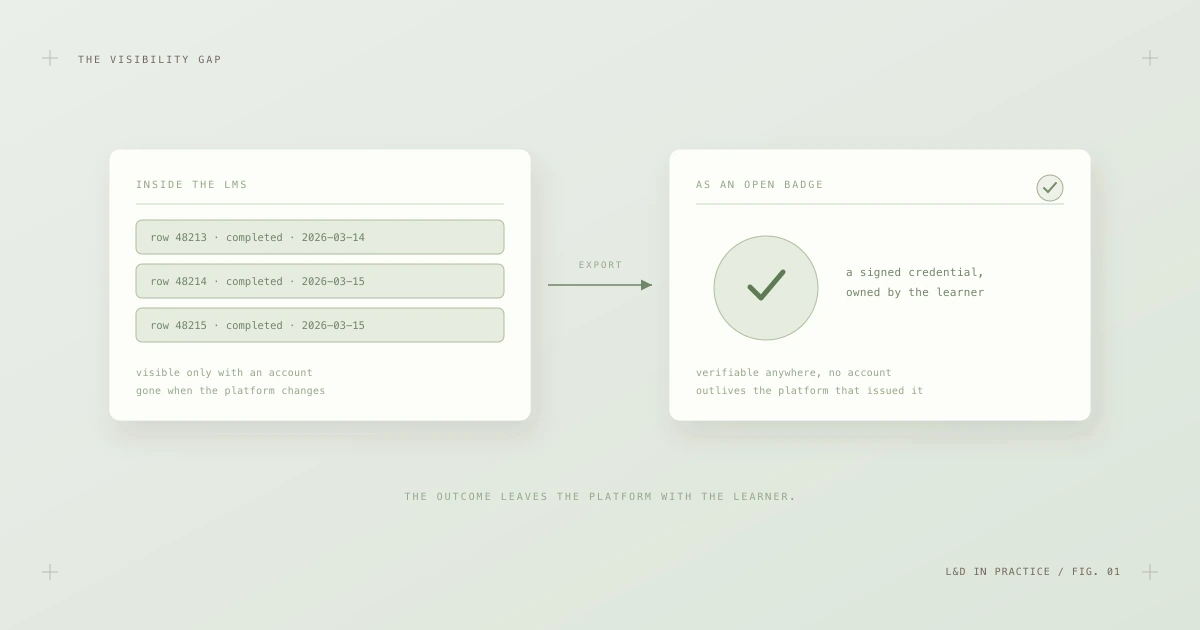
Fig. 1 — The visibility gap. A completion row belongs to the platform; an Open Badge belongs to the learner.
The problems compound quietly:
- Managers can't see competence. They see completion percentages on dashboards, which say nothing about whether a skill was assessed or merely clicked through.
- Learners can't take anything with them. The record is locked to a platform and an employment contract. Years of genuine development vanish at offboarding.
- Other departments can't reuse the signal. A certification earned in one business unit is invisible to a hiring manager in another, so people get re-trained on things they already know.
- Nobody outside the company can trust any of it. A line on a résumé saying "completed advanced incident response training" is unverifiable, so recruiters discount it to zero.
The irony is that L&D teams work hard to produce real outcomes and then store them in the one format guaranteed to keep those outcomes invisible. Open Badges exist to close exactly this gap.
What an Open Badge actually adds
An Open Badge is not a nicer certificate image. As covered in What is an Open Badge?, it is a portable data file — since Open Badges 3.0, a full W3C Verifiable Credential — that describes who achieved what, against which criteria, with what evidence, signed cryptographically by the issuer. The standard is maintained by 1EdTech and is deliberately vendor-neutral: a badge issued from any compliant platform can be read and verified by any other.
For an L&D program, three properties matter most:
- Portability. The credential lives with the learner — in a wallet app, a LinkedIn profile, an email attachment — and keeps working after they leave the company, the vendor contract ends, or the LMS is replaced.
- Verifiability. Anyone can confirm the badge is genuine, unmodified and still valid in seconds, using an independent validator, without contacting your team. Verification is pure cryptography plus a couple of HTTP requests — no accounts, no phone calls, no "please confirm employment dates" emails.
- Meaning. The badge carries its own criteria and evidence. It doesn't just say trained; it says assessed against these published standards, with this work product as proof.
That combination changes the economics of internal mobility, compliance reporting and external hiring all at once — but only if the badges are designed well, which is where most programs stumble first.
Design around pathways, not one-off courses
The fastest way to kill a badge program is to mint a badge for every webinar. Recipients stop claiming them, managers stop reading them, and within a year "badge" means "attendance sticker". The design pattern that works is stacking: small, honest credentials that accumulate into larger, genuinely valuable ones.
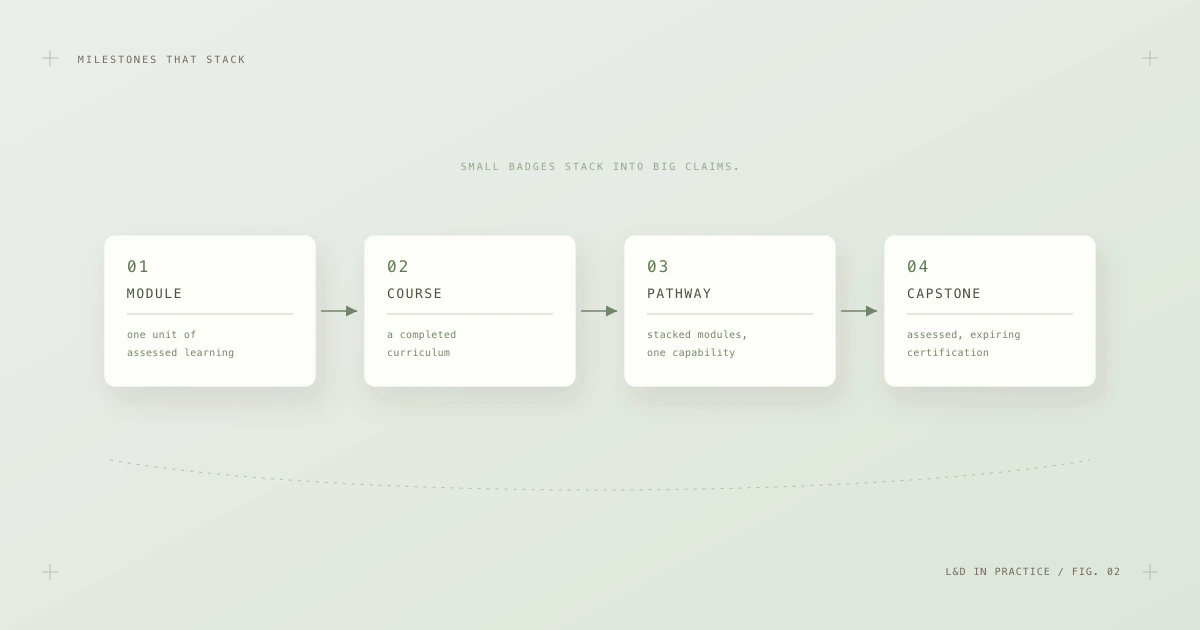
Fig. 2 — Milestones that stack. Each level means more because the levels below it were actually assessed.
A workable hierarchy looks like this:
- Module badges recognize one unit of assessed learning — a lab passed, a scenario completed. Issue them sparingly and only where assessment exists.
- Course badges mark a completed curriculum: several modules plus a summative assessment.
- Pathway badges stack courses into a named capability — "Cloud Security Practitioner", "People Manager Foundations" — and are the level managers actually care about.
- Capstone certifications sit on top: rigorously assessed, time-limited credentials with an expiry date that matches how fast the underlying skill decays.
The discipline this imposes is healthy. If a proposed badge can't articulate what was assessed — not attended, assessed — it probably shouldn't exist. The broader thinking behind this is covered in Open Badges for skills recognition: a badge is a claim about capability, and claims without assessment are noise.
Criteria and evidence: the difference between a badge and a sticker
Every Open Badge embeds an achievement definition, and the quality of your program lives or dies in that definition. Compare "completed Incident Response training" with the badge below:
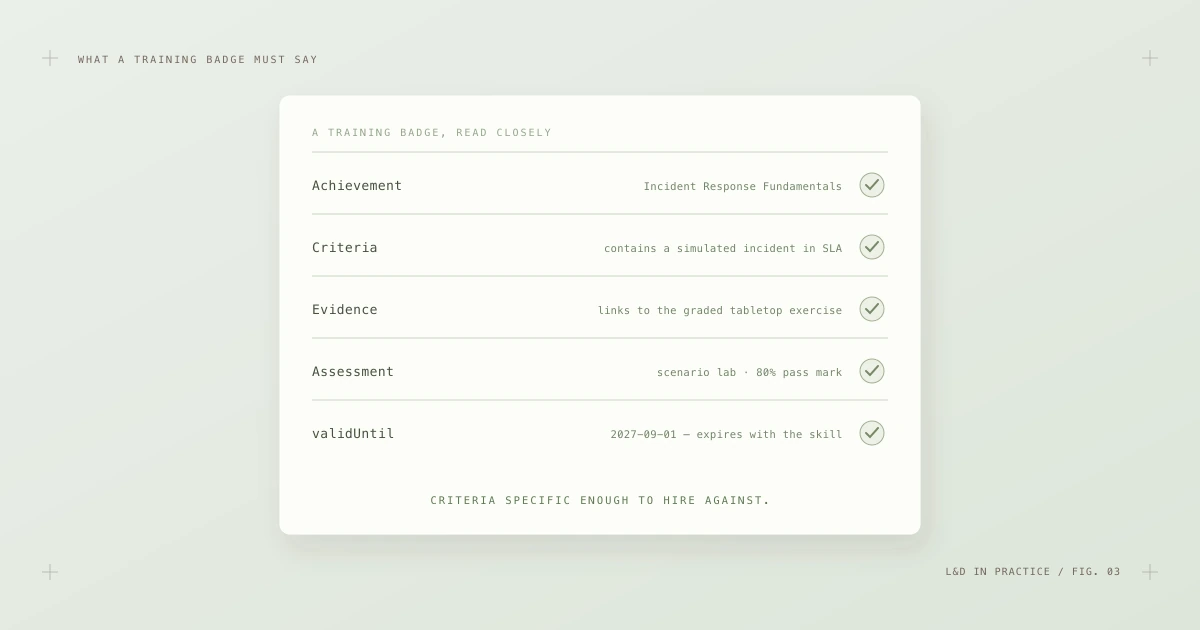
Fig. 3 — What a training badge must say. Specific criteria, linked evidence, a named assessment and an honest expiry date.
The elements worth sweating over:
- Criteria should be specific enough that a stranger could decide whether they'd hire against them. "Contains a simulated incident within SLA" beats "understands incident response" every time.
- Evidence should link to real, assessed work where confidentiality allows — the graded exercise, the project artifact, the scenario transcript. Evidence is what separates a credential from an assertion.
- Assessment should be named: a scenario lab with an 80% pass mark reads very differently from an unproctored quiz.
- Validity should be honest. First-aid skills decay; so do cloud certifications. A
validUntildate that matches reality keeps the credential meaningful and gives your L&D calendar a natural recertification rhythm.
Write these before anyone opens a design tool. The artwork is the least important part of the badge — a point the security basics article makes from the other direction.
Where badges fit the training lifecycle
A common misconception is that badging is a bolt-on at the end: run the course, then "add badges". In practice, the badge is designed first and issued last.
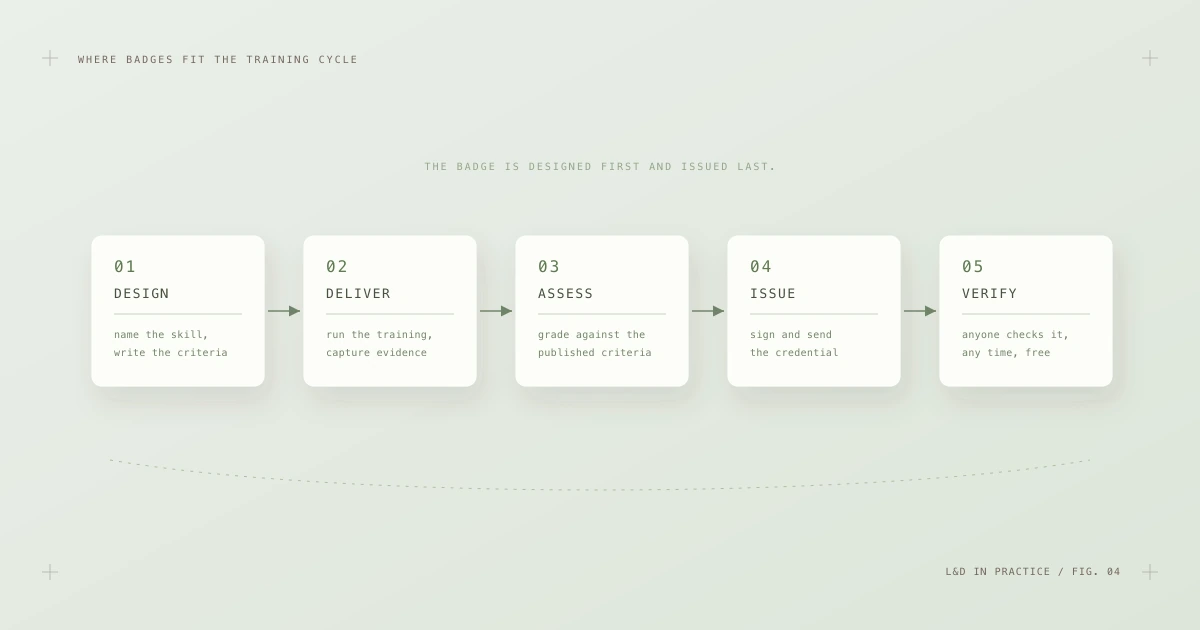
Fig. 4 — The training cycle with badges in their proper place: criteria at the start, issuance at the end, verification forever after.
Working backwards from a published criteria statement sharpens everything upstream: the course content must actually teach what the criteria demand, and the assessment must actually measure it. Then, at the end:
- Issue Open Badges 3.0 credentials, signed and delivered as both a baked image file and a hosted URL. The mechanics — issuer profiles, signing keys, delivery — are covered step by step in How to issue Open Badges.
- Use a platform unless you have strong reasons not to. Key management, hosting and recipient experience are genuinely hard to do well in-house. Credentialing platforms like Certifier handle issuing, delivery and hosted verification pages at scale, which lets a small L&D team run a program that behaves like a large registrar's.
- Teach recipients what they received. Thirty seconds of onboarding — "this is a verifiable credential; share the link, not a screenshot" — prevents most of the support tickets and most of the verification dead ends later.
Four audiences, one credential
A well-designed training badge answers a different question for each person who encounters it.
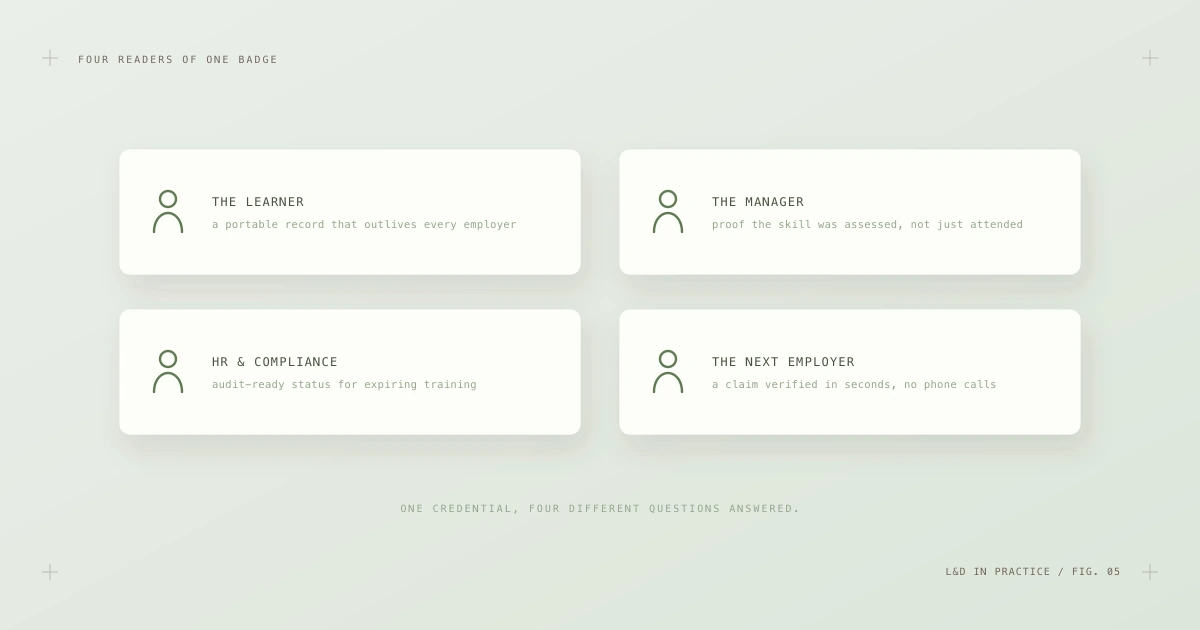
Fig. 5 — Four readers of one badge. Each gets a different answer from the same credential.
- The learner gets a portable record that outlives every employer and every platform — a career asset, not a database row.
- The manager gets proof the skill was assessed, not just attended, plus visibility into what their team can actually do.
- HR and compliance get audit-ready status for mandatory training: who is certified, who has expired, all checkable without spreadsheet archaeology. For regulated training, expiry dates and revocation turn compliance reporting from a quarterly scramble into a query.
- The next employer gets a claim they can verify in seconds without calling your HR department — which, not incidentally, also stops your HR department fielding those calls.
Compliance deserves one more sentence, because it's where badge programs often pay for themselves first. When a certification is revocable and expirable in the credential itself, "is this person currently certified?" becomes a live check against the issuer's status list rather than a trawl through training records. Auditors like that. So do the people who used to assemble the evidence by hand.
Measure the program, not the PNG
Badge programs produce seductive vanity metrics — badges issued, badges designed. The numbers that actually indicate health are about behavior:
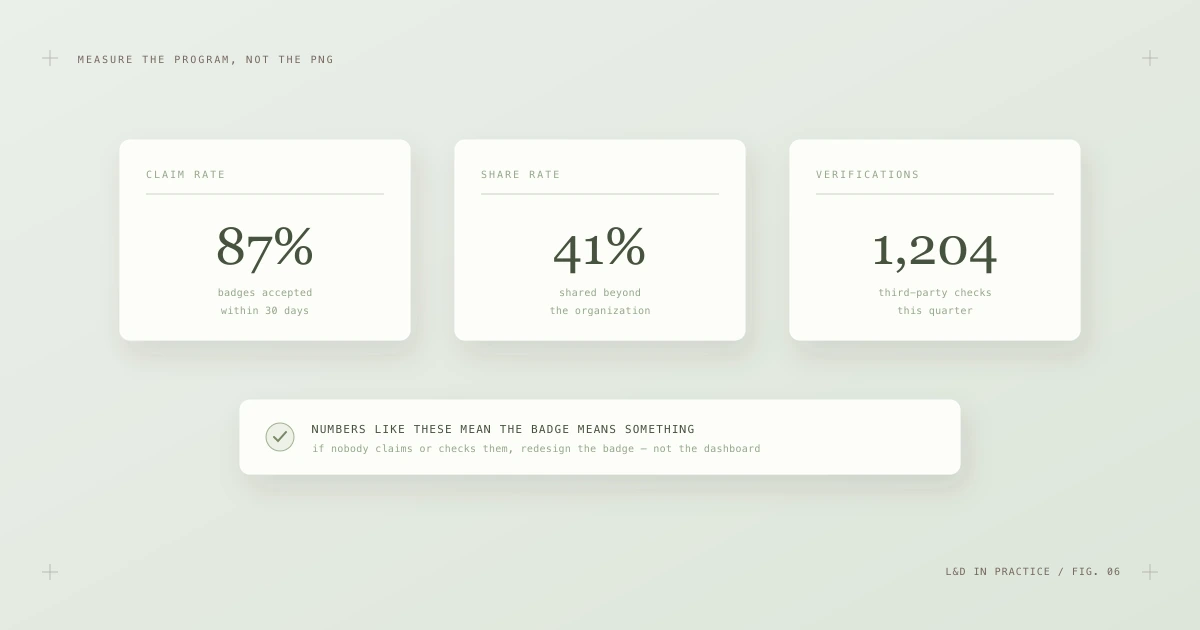
Fig. 6 — Measure the program, not the PNG. Claim, share and verification behavior tell you whether the badge means anything.
- Claim rate — what share of issued badges do recipients actually accept? A low claim rate means recipients don't value the credential, and no amount of internal marketing fixes a badge that isn't worth claiming.
- Share rate — how many badges travel beyond the organization, to LinkedIn or personal portfolios? Sharing is the clearest signal that learners consider the badge career-relevant.
- Verification events — are third parties actually checking the credentials? Verifications are the ultimate compliment: someone outside your walls made a decision partly based on your badge.
- Recertification rate — for expiring credentials, do holders renew on time? This doubles as a measure of whether the skill is still in demand internally.
When these numbers sag, the instinct is to promote harder. The better move is almost always to redesign: tighter criteria, a more meaningful level in the stack, a pathway managers actually reference in staffing decisions.
A rollout that survives contact with reality
Most failed badge programs die of ambition — fifty badge types at launch, no governance, and an LMS integration project that outlives its sponsors. The programs that survive start embarrassingly small.
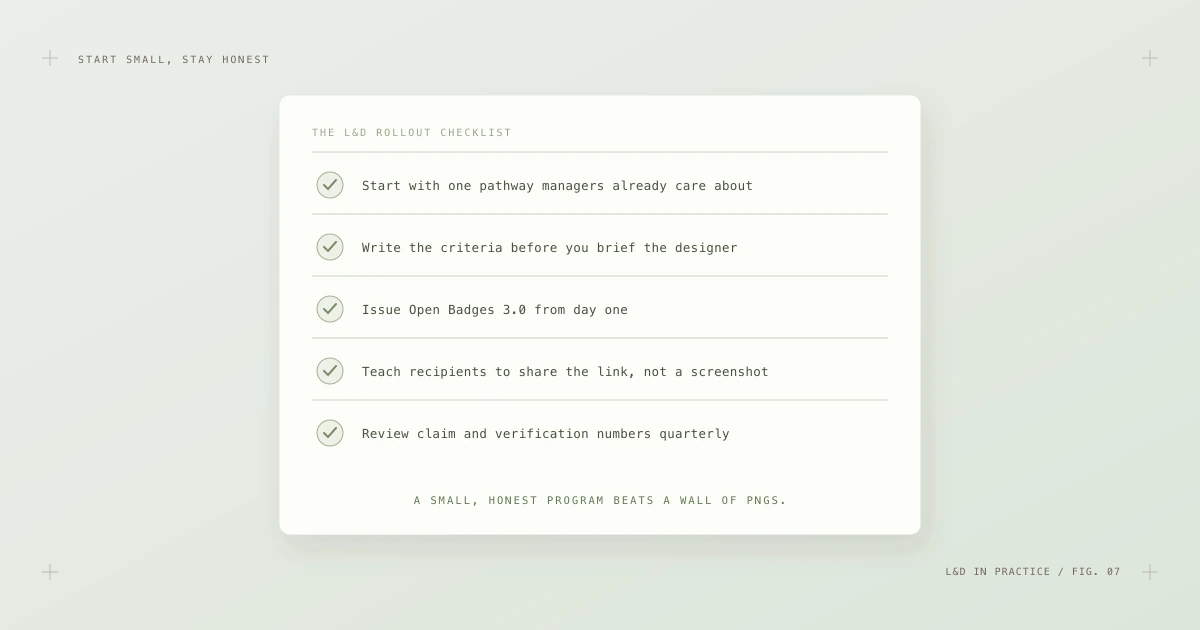
Fig. 7 — The rollout checklist. One pathway, criteria first, 3.0 from day one, and a quarterly look at the numbers.
- Start with one pathway managers already care about — the certification they already ask about in staffing conversations. One meaningful pathway beats twenty decorative badges.
- Write the criteria before you brief the designer. If the criteria are weak, the artwork is a liability.
- Issue 3.0 from day one. Legacy 2.0 badges depend on the issuer's server staying alive forever; 3.0 credentials carry their own proof. There is no reason for a new program to take on 2.0's fragility.
- Teach recipients to share the link, not a screenshot. Screenshots can't be verified; hosted URLs and baked files can.
- Review the numbers quarterly and prune ruthlessly. A badge nobody claims is telling you something.
As the program grows, operational concerns take over — key rotation, URL stability, revocation policy, what happens when a course is retired. Those are solved problems with known runbooks, collected in Managing an Open Badge program at scale.
The habit that makes it all work
Everything above depends on one cultural habit: people actually verifying badges instead of glancing at them. The good news is that verification is now the easy part. Any manager, recruiter or auditor can drop a badge file or URL into the Open Badge validator and get a full report — structure, cryptographic proof, revocation status, expiry — in seconds, with no account and nothing stored. If you're curious what happens under the hood, how it works walks through every check.
For L&D teams, that's the quiet payoff. You stop being the department that owns a reporting database and start being the department that issues credentials people carry for the rest of their careers — credentials that keep telling the truth about your training long after the learner, the platform and possibly the company have all moved on. Training has always produced value. Open Badges just make the value visible, portable and provable — which, it turns out, is most of what was missing.